FIN-320 Vehicle Photo Guide: What to Photograph for a Remote BC Appraisal
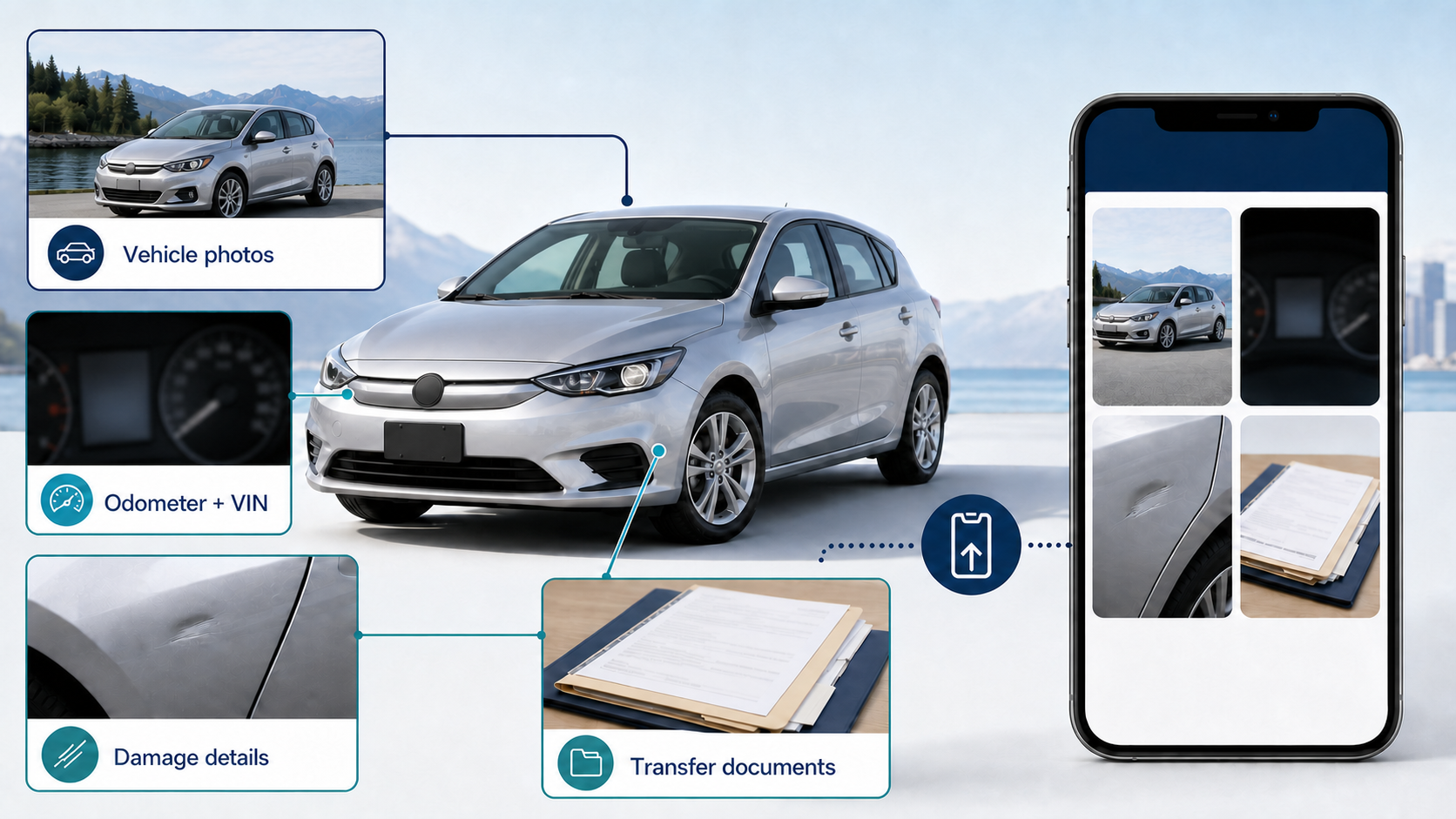
A complete photo set helps the appraiser see the vehicle you actually bought, not just its year and model. Use this mobile-friendly checklist before you upload your FIN-320 appraisal file.
Why buyers use this page
- One checklist for the complete vehicle, identifiers, condition, and transfer paperwork
- Designed for an eligible $75 remote FIN-320 appraisal file
- Clear originals from a phone are suitable when the details are readable
- Missing, blurry, cropped, or outdated photos can delay review and acceptance
FIN-320 Vehicle Photo Guide BC
Remote vehicle appraisal depends on clear, current evidence. Start with full-vehicle views, then document the odometer, VIN, cabin, wheels, damage, wear, and transfer paperwork. The appraiser may request more photos when the vehicle has unusual equipment, title history, repairs, modifications, or condition issues. Photos support a market-value review; they do not replace a mechanical, structural, or safety inspection.
Why the full photo sequence matters
A close-up of one dent does not show the rest of the vehicle, and four clean exterior photos do not show the mileage, interior wear, warning lights, tires, or transfer documents. The strongest file combines context and detail: wide views establish the complete vehicle, identifiers connect the evidence to that vehicle, and close-ups show the specific facts that may affect market value.
The eight core photo groups
Take these in daylight when possible. Use recent originals and keep the full subject inside the frame.
Four corner views
Take front-left, front-right, rear-left, and rear-right views from far enough away to show the entire vehicle, wheels, bumpers, lights, glass, and body panels.
Both full side profiles
Photograph the complete driver and passenger sides. Avoid cutting off the bumpers, roof, wheels, bed, cargo box, or attached equipment.
Odometer and dashboard
With the vehicle safely parked, photograph the illuminated odometer so the kilometres are readable. Add warning-light or dashboard messages when they are present.
VIN and vehicle identifiers
Provide a sharp photo of the VIN label or plate and make sure every character is readable. Include registration identifiers requested in the appraisal form.
Interior and cargo areas
Show the front and rear seats, dashboard, steering wheel, flooring, headliner, trunk, bed, or cargo area. Include wear, missing pieces, stains, damage, or installed equipment.
Wheels and tires
Show all wheels and visible tire condition. Add close-ups of uneven wear, damaged rims, mismatched tires, or other details that are relevant to the vehicle.
Damage, rust, and repair needs
Take one wider photo to locate each issue, then a close-up for detail. Include dents, scratches, corrosion, broken trim, cracked glass, leaks visible safely, and incomplete repairs.
Transfer and ownership documents
Photograph the signed APV9T or requested transfer form, bill of sale, and current registration flat and in good light. Keep the full page and all required fields readable.
How to take photos the appraiser can use
Good technique is simple: show the complete object, keep it sharp, and do not hide value-affecting details.
Use even light and a steady camera
Daylight or a bright indoor space usually works best. Wipe the camera lens, hold the phone steady, tap to focus, and check each image before leaving the vehicle.
Keep one wide view with every close-up
A close-up shows detail but not location. Pair damage, rust, equipment, or repair photos with a wider image that shows where the item sits on the vehicle.
Upload original images
Avoid screenshots, heavy filters, collages, social-media downloads, or photos compressed until text and condition details become unreadable.
Document condition honestly
Photograph clean areas and problem areas. Do not crop out damage, cover warning lights, or describe a mechanical issue that the available evidence cannot support.
Add these photos when they fit the vehicle
Specialty vehicles need the same core sequence plus evidence for the features or history that make the file different.
Work trucks and cargo vehicles
Add the bed, box, cargo floor, shelving, racks, towing hardware, service body, tool storage, commercial-use wear, underbody areas visible safely, and equipment included in the sale.
Imported or out-of-province vehicles
Add prior registration, import or title documents, inspection records, steering side, odometer units, modifications, compliance labels, and any visible rust or repair history.
Used EVs and hybrids
Include the instrument display, charge-port area, charging equipment included in the sale, warning messages, tire condition, and available battery or service records.
Rebuilt, repaired, or modified vehicles
Add title-brand and inspection documents, repair invoices, photos of repaired areas, remaining defects, aftermarket equipment, and clear views of modifications.
What photos cannot replace
A photo set supports the valuation file, but some questions need separate documents or professional inspection.
Mechanical or safety inspection
Photos cannot confirm roadworthiness, hidden corrosion, structural quality, internal mechanical condition, or compliance. Use a qualified inspection when those questions matter.
Proof of purchase and payment
Vehicle images do not prove the sale amount. Keep the bill of sale, transfer form, payment evidence, and registration or tax receipts required for the applicable workflow.
Ownership or authority to transfer
A valuation does not decide who can sell, transfer, register, or act for an estate, business, lender, trustee, or legal file. Confirm authority separately.
A predetermined value or tax result
Good photos make the evidence clearer; they do not guarantee a particular appraised value, broker decision, refund, tax amount, or other outcome.
Prepare and upload your photo set
Park safely, gather the transfer documents, and take the complete exterior, identifier, interior, condition, and vehicle-specific photo sequence.
Review every image for focus, glare, cropped edges, readable VIN and odometer details, and honest coverage of damage or wear before uploading originals.
Submit the file for review. We request missing evidence before acceptance, then deliver an eligible signed FIN-320 after the application is accepted and paid.
FIN-320 Vehicle Photo Guide BC FAQ
How many photos do I need for a FIN-320 appraisal?
There is no single count that fits every vehicle. Cover the eight core photo groups, including four corners, both sides, odometer, VIN, interior, wheels and tires, damage or wear, and transfer documents. Specialty or rough-condition vehicles usually need extra detail photos.
Can I take the appraisal photos with my phone?
Yes. A current smartphone is suitable when the lens is clean, the subject is in focus, the lighting is even, and identifiers and documents remain readable.
Should I photograph damage even if the seller already described it?
Yes. Take a wider photo that shows the location and a close-up that shows the detail. Include rust, warning lights, interior wear, broken parts, incomplete repairs, and other value-affecting condition you can document safely.
Which document photos should I upload?
For the standard private-sale workflow, upload the signed APV9T or requested transfer form, bill of sale, current registration, and any other document requested in the application. Refund, import, estate, rebuilt, or specialty files can require additional evidence.
What if the vehicle has no visible damage?
Still provide the complete photo sequence. The appraiser needs to see the overall exterior, mileage, VIN, cabin, wheels, tires, cargo areas, and paperwork rather than only problem spots.
Do photos prove the vehicle is mechanically sound?
No. Remote appraisal photos support a market-value review. They do not replace a mechanical, structural, safety, or out-of-province inspection.
What happens if a photo is blurry or missing?
We may ask for a replacement before accepting the file. Missing or unreadable evidence can delay review because the appraisal must be based on the specific vehicle and the documents available.
Helpful next steps
Use these supporting pages to keep moving.
Ready to document your vehicle's value?
Start a $75 certified FIN-320 appraisal. The 1-hour delivery window begins after your application is reviewed and accepted.
Start Your Appraisal Now